
More buyers today are walking into a home and asking one simple question before anything else: Will this space work for me? Not just for sleeping or cooking, but for working. A home office has moved from a nice-to-have to a near dealbreaker. If your space already has one, that is a serious advantage. A few smart, affordable upgrades can make that room go from forgettable to unforgettable.
Why Home Office Spaces Sell Homes Faster Now
Remote and hybrid work has completely changed what buyers look for. Office spaces inside homes are no longer decorative. They are functional rooms that need to perform. Buyers are evaluating square footage differently, and a well-set-up office can push your listing above others in the same price range.
What makes a difference is not square footage alone. It is how the space feels when someone walks in. Does it look like it actually works? Does the lighting feel right? Are there outlets where you need them? These small things communicate readiness without the buyer having to imagine it.
A polished home office also signals that the rest of the home has been cared for. Buyers read rooms. When the office looks intentional and modern, it builds trust for the whole property.
Plug Points & Power: What Buyers Actually Notice
Nothing frustrates a tech-savvy buyer more than walking into an office with one outlet on the far wall. Adding USB-C wall outlets or a few extra standard plugs in the right places is one of the most practical upgrades you can make. It costs very little, and the impact is immediately visible.
Consider a floor-level outlet near the center of the room if your layout allows it. These are a practical signal to any buyer who works with multiple monitors or charges devices throughout the day. Pair this with cable management channels along the baseboard, and the room instantly looks more professional.
Quick Win
Swapping one standard outlet for a smart outlet with USB-A and USB-C ports costs around $20-$40 and takes under 30 minutes. Buyers who work from home will notice it immediately.
If you are working with a real estate partner like Mill City Home Buyers, they can help you identify which upgrades give the most return in your local market before you commit to spending.
Lighting That Makes the Room Look Like It Means Business
Overhead lighting is fine for living rooms. In a home office, buyers are mentally placing themselves in a video call. They are thinking about glare, shadows, and how the room photographs. Good lighting in an office is a selling point that most sellers overlook entirely.
A bias light strip behind the monitor wall, a desk lamp with adjustable color temperature, or even just swapping the ceiling fixture for a matte LED panel can make the room feel polished. You do not need expensive smart lighting; neutral daylight bulbs in the 4000K-5000K range are affordable and make the space look sharper and cleaner.
| Upgrade Item | Estimated Cost |
|---|---|
| LED Panel Light | ~$35-$60 |
| Bias Lighting Strip | ~$15-$30 |
| Daylight Desk Lamp | ~$25-$55 |
| Smart Dimmer Switch | ~$20-$45 |
Wired Internet Access: A Quiet Dealmaker
Wi-Fi is everywhere, and yet a home with a hardwired Ethernet port in the office is still something that stands out. For buyers who work in video production, finance, gaming, or any field with heavy data use, a Cat6 Ethernet port in the wall is not a luxury; it is a need.
Running a single Ethernet line to the office and terminating it with a wall plate is a job that a handyman or a confident DIYer can do in a few hours. The finished result looks clean and adds genuine, measurable value for the right buyer.
A simple Ethernet port in the wall says to a buyer: this house was built for someone who takes work seriously.
You can go a step further by adding a small recessed media box behind the desk area where Ethernet, power, and HDMI all meet in one tidy panel. These run about $50-$100 in parts and create a very impressive, finished look during a showing.
Smart Storage That Does Not Look Like Storage
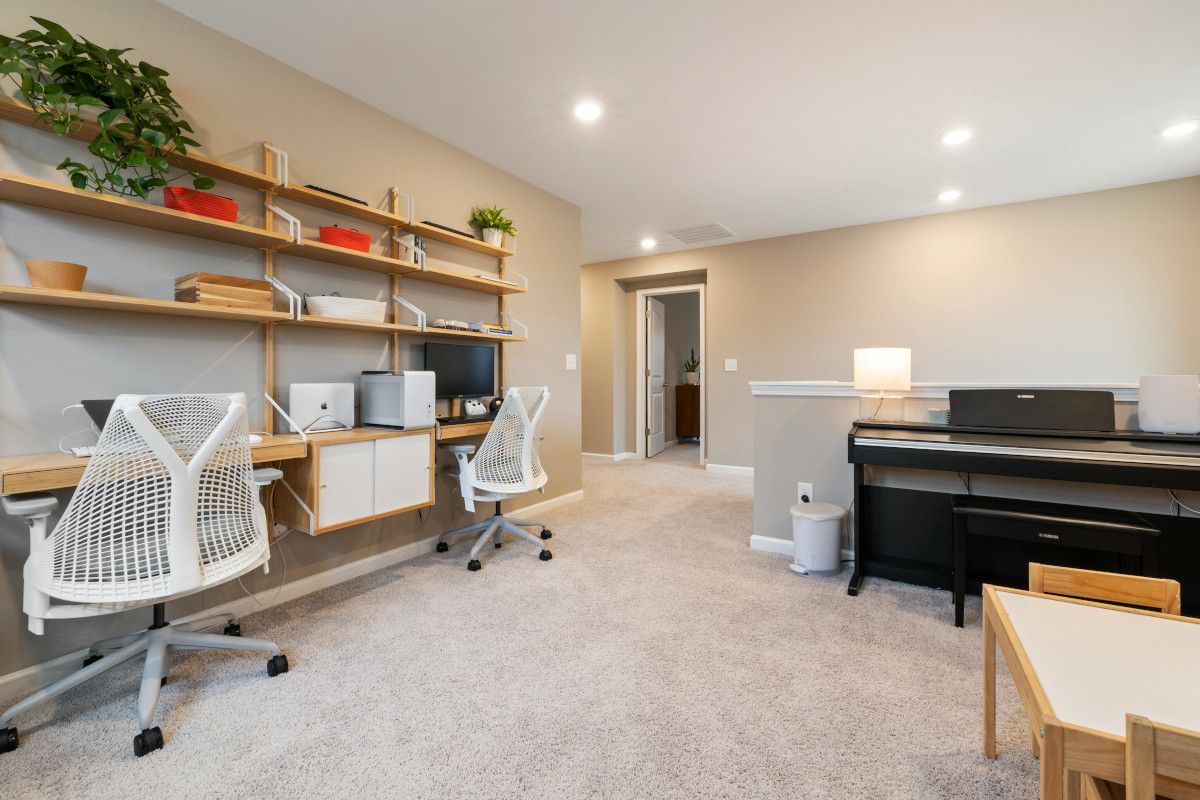
Buyers are practical. They want to know where things go. A home office without storage reads as chaotic, even if it is empty during the showing. Adding floating shelves, a wall-mounted monitor arm, or a slim storage unit that keeps the floor clear signals organization without looking overdone.
Monitor arms deserve special mention. For about $30-$70, a monitor arm frees up desk surface, makes the room look modern, and is something buyers who work from home genuinely appreciate. Pair it with a simple cable management sleeve, and the desk area looks clean and deliberate.
Staging Tip
Keep one well-styled shelf in the office with books, a plant, and one or two neutral accessories. Empty offices feel unfinished. Overstuffed offices feel cramped. One styled shelf hits the sweet spot.
Keeping Costs Low While Making Impact High
You do not need to renovate. Most of these upgrades cost under $200 combined and can be done in a weekend. The goal is to make the room feel ready, like a buyer could move in and start working on Monday morning without changing a thing.
Prioritize what is visible and functional. Lighting, outlets, and cable management are the three areas that photograph well and feel great in person. Storage and a hardwired connection are bonuses that convert the serious buyer who asks follow-up questions during a showing.
Think of each upgrade as a quiet conversation with the buyer. It says: the person who lived here worked from home and took that seriously. That story, told through a clean and capable office, can be exactly what tips a hesitant buyer into making an offer.
Total Estimated Budget
Outlets + lighting + cable management + monitor arm + one styled shelf = roughly $150-$300 total. Return on this investment is typically 5-10x in buyer perception and offer speed.
FAQs
Why is having a home office important for buyers today?
Home offices have shifted from a luxury to a necessity due to the rise of remote and hybrid work. Buyers now prioritize functional office spaces, evaluating how well they can work in the home, making it a critical factor in their purchasing decision. A trend that Mill City Home Buyers takes into account when assessing a property's appeal.
What small upgrades can I make to my home office to attract buyers?
Consider adding USB-C wall outlets, good lighting, a hardwired Ethernet port, and smart storage solutions like floating shelves or monitor arms. These affordable upgrades can enhance the functionality and aesthetic of your office, making it more appealing to buyers.
How do lighting and power outlets impact buyer perception of a home office?
Proper lighting and accessible power outlets are crucial for creating a professional and functional atmosphere. Buyers appreciate well-lit spaces that reduce glare and shadows, as well as multiple outlets to accommodate their tech needs, which signals that the home is ready for work.
What is a cost-effective way to upgrade my home office?
Most upgrades can be done for under $200 and completed in a weekend. Focus on visible and functional elements like lighting, outlets, and cable management to enhance the appeal of your office without undergoing a full renovation.